
OpenAI's Codex Micro: A Keyboard to Steer the AI Agent
In Brief
- OpenAI and keyboard maker Work Louder have released the Codex Micro, a dedicated controller for the Codex coding agent.
- It sells for $230 as a limited run, ordered from OpenAI's supply store.
- The idea is to run a build without the laptop keyboard: dictate prompts by voice, turn a dial to change the model's reasoning effort, and switch between the agent's tasks with mapped keys.
- Every key, the dial, and the stick can be remapped to the Codex actions you use most, from opening a pull request to triggering a playful pet that shows the agent's status.
- In OpenAI's demo, the GPT-5.6 Sol model builds a browser word game from the first prompt to going live while the presenter drives entirely from the Micro.
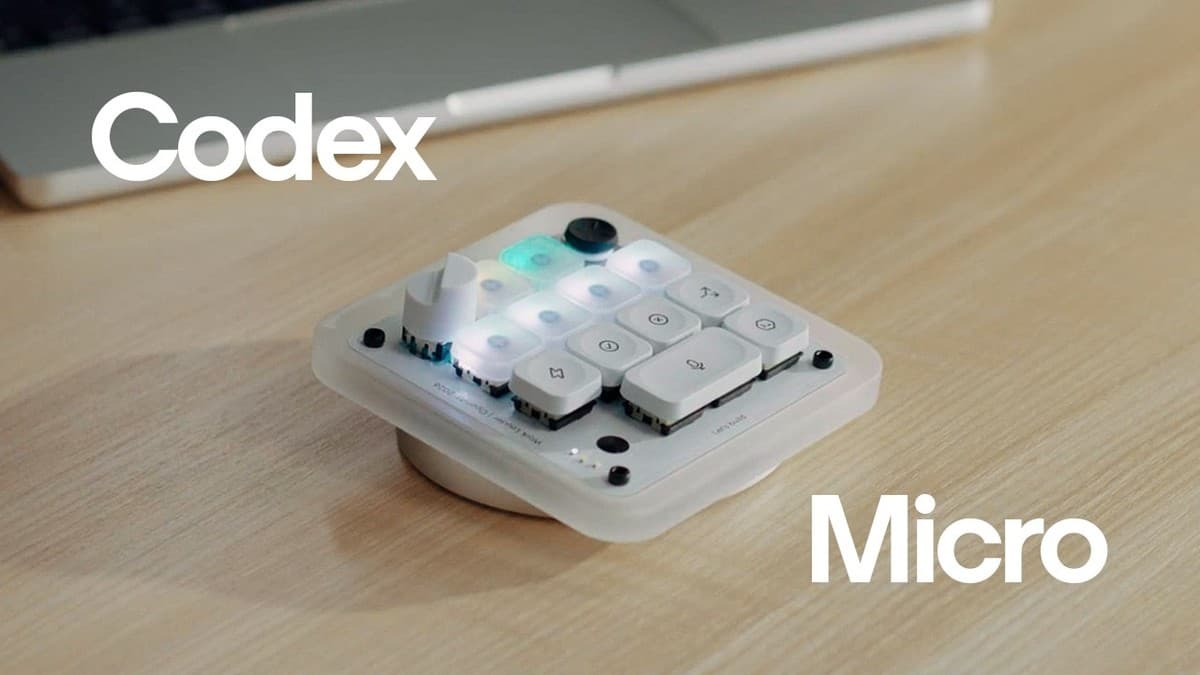
OpenAI, the company behind ChatGPT, has built a piece of hardware for its coding agent. The Codex Micro is a small keyboard, made with Work Louder, a boutique maker of custom mechanical keyboards, for driving Codex without reaching for the laptop keyboard. It costs $230, and instead of typing every instruction you hold a key and speak, turn a dial to shift how hard the model thinks, and tap mapped keys to move between the jobs the agent is running.
What the Codex Micro is built to do
Codex is OpenAI's coding agent. You give it a goal in plain language, and it writes, edits, and runs code across your project to get there, usually over several steps. That changes what your hands actually do. There is less typing of code and more starting tasks, checking progress, approving actions, and steering between jobs. It is a small sign of how coding with an agent shifts the work from writing every line to directing it.
The Micro is built for that second kind of work. It is a keyboard with a few extra controls: an analog stick at the top, a dial, and a set of keys you assign yourself. Work Louder, the keyboard maker OpenAI partnered with, is known for customizable mechanical keyboards and shortcut pads, and the Micro fits that mold. The point is not to replace your laptop, but to give the non-typing parts of agent work a place of their own.
Driving a build by voice, dial, and keys
In the demo, the presenter uses OpenAI's GPT-5.6 Sol model inside Codex to build a small browser word game called One Letter Off, where you change one letter at a time to turn "cold" into "warm." The whole build runs from the Micro.
It starts with voice. Hold one key, talk, and the spoken words land in Codex as a written prompt, with no laptop keyboard involved. In the demo the instruction is a full spec in one breath: build the game, add a 30-second timer, streaks, and satisfying tile animations.
The analog stick handles quick actions. You can map it to the skills you reach for most, or, by default, swipe up to put Codex in Plan mode, where the agent lays out its approach before it changes anything. A skill here is a reusable workflow you have taught Codex: the standards and steps it should follow for a certain kind of job.
The dial controls reasoning effort. A turn moves Codex between a quick task and deeper reasoning without breaking your flow, so a fast job and a slow, careful one are only a twist apart.
Keeping several Codex tasks moving
Codex can work on more than one thing at a time, and the Micro is built around that. In the demo, the game is only one of several pinned tasks, and each task maps to its own key, so a single press jumps between them. A glance at the device shows what is running and what is waiting on you.
When the Codex app sits in the background, a double tap shows what needs your attention. When the agent pauses to ask permission before running something, you switch over and press Accept. You can also hold the voice key again to queue up more work without losing your place, which is how the presenter adds a punchier win state and a streak counter to the game mid-run. When Codex finishes, the game is live, built from the Micro.
Mapping the Codex Micro to your workflow
Every control on the Micro is customizable. You map the keys, the stick, and the dial to the Codex actions you use most. That might be running a common skill, opening a pull request (the request to merge your new code into the shared project), or something lighter, like triggering your Pet, an optional animated companion that shows the agent's status while it works.
What the Codex Micro costs and how to get one
The Codex Micro costs $230 and is a limited-run collaboration between OpenAI and Work Louder. You order it from OpenAI's supply store, on the Codex Micro product page. A single-purpose keyboard at that price is a niche buy. It makes sense mainly for people who already spend enough of the day steering Codex that moving those actions off the laptop keyboard saves them real time.
Related reading: